Helping service-based businesses gather, manage, and showcase reviews with ease.
Confidentiality Note:
Certain names/branding have been changed while keeping the design story authentic.
Technologies:
Figma
The Beginning — and Mr. Stars
I’ve worked with Mr. Stars for years. He’s the kind of guy who can sell sand in a desert — founder of one of New Jersey’s biggest digital marketing agencies, sharp as a tack, and always thinking ten moves ahead.
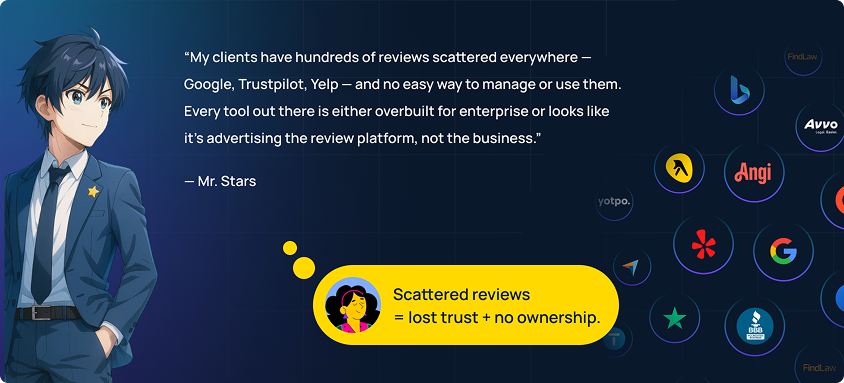
He wasn’t wrong. Existing platforms like GatherUp, Birdeye, Podium, Reviews.io, and G2 were powerful, but bloated for his audience: small to mid-sized service businesses. These were plumbers, law firms, plastic surgeons — experts in their craft, but definitely not tech wizards.
That’s how Starwave was born — a platform built to — Gather → Get More → Showcase → Respond
without requiring a crash course in software.
From Big Ideas to MVP Reality
Mr. Stars is ambitious. The kind of ambitious that keeps a designer’s Figma tabs full. In the early days, features kept piling on — “what if we add AI summaries?” “what if we do sentiment graphs?” — and since we were on an hourly contract, there was no fixed scope to rein it in.
But I knew what would happen if we didn’t focus: the product would balloon into something no small business owner would want to touch. So, I had the conversation.

I walked Mr. Stars through what an MVP really means, why less can be more, and how launching lean lets you learn faster. To his credit, he got it. From that point on, we stopped adding and started trimming.
One of those trims? AI.
At the time, it was just starting to rise in the mainstream, but not mature enough for reliable production features. We decided to keep AI-powered ideas — like automated review reels or sentiment-based recommendations — on the future roadmap and focus on delivering something stable today.
Designing for the Non-Designer
We skipped heavy wireframes — the MUI design system gave us a solid visual foundation — and instead sketched quick flows to validate ideas early. This speed kept things tangible for Mr. Stars and his team, and meant less time explaining boxes and arrows, more time designing something real.

Daily standups became our rhythm. In the early days, I mostly observed calls with the client, but as the project progressed, I stepped into leading conversations — explaining UX logic, walking through flows, and addressing edge cases with the PM and developer in real time.
Every decision came back to one question: “Would a busy, non-technical business owner get this?”
The Navigation Tour
Starwave launched with a carefully trimmed set of features — the essentials that small business owners could understand instantly and put to work without training.
- Dashboard Review trends, sentiment, quick actions.
- My Reviews Hub to manage, respond, & tag reviews.
- Review Requests Campaign builder for asking feedback.
- Review Page Shareable landing page to collect reviews.
- Widgets Embeddable website elements.
- Social Share Graphics for posting on social media.
- Company Settings Branding, customization preferences.
- Help Simple support resources.

Where It Got Interesting —
The Features That Set Starwave Apart
1/7 Review Overrides Without Breaking Trust
A Google review might tell you when it was posted and who posted it — but if the user’s name is “rockstar_1” and you’re a law firm, you’re not putting that on your homepage.
We built a way for users to override certain review details just for Starwave’s displays — adding a location, job title, professional name format, or even an image. The original stays untouched on the source platform, but the widget and social share post look polished and on-brand.
To keep it transparent, any modified review gets a small “Modified” tag in the dashboard so the owner knows they’ve changed it.
 2/7 Tags for Smart Showcasing
A single IT company might handle cybersecurity, cloud hosting, and development — and want different testimonials on each service page.
Tags let them filter reviews for each purpose, and even hide ones they’d never want public (abusive, off-topic, or just irrelevant).

3/7 Campaign Builder – Asking for Reviews Without the Headache
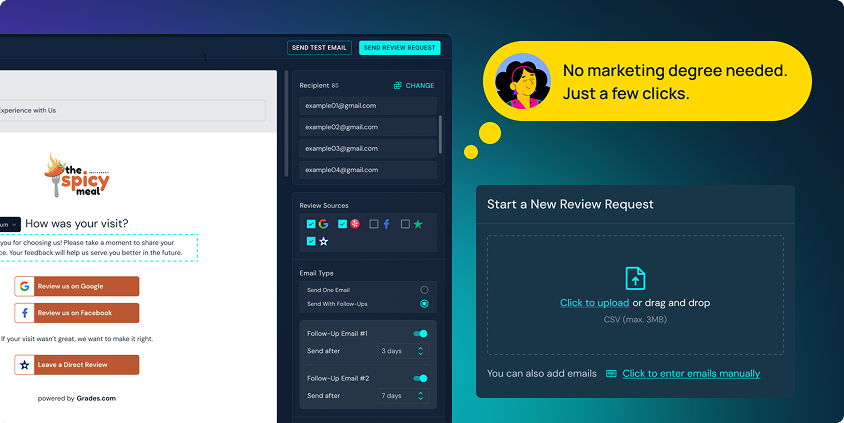
The Review Requests module gave owners a simple, repeatable way to get more reviews:
- Start from one clean template, customize logo/colors once.
- Add customers manually or via upload.
- Choose to request public reviews, private feedback, or both.
- Preview before sending, schedule up to two follow-ups.
- View campaign history with basic delivery stats.
No marketing degree needed — just a couple of clicks and they were ready to send.
4/7 The Review Landing Page – One Link, All Options
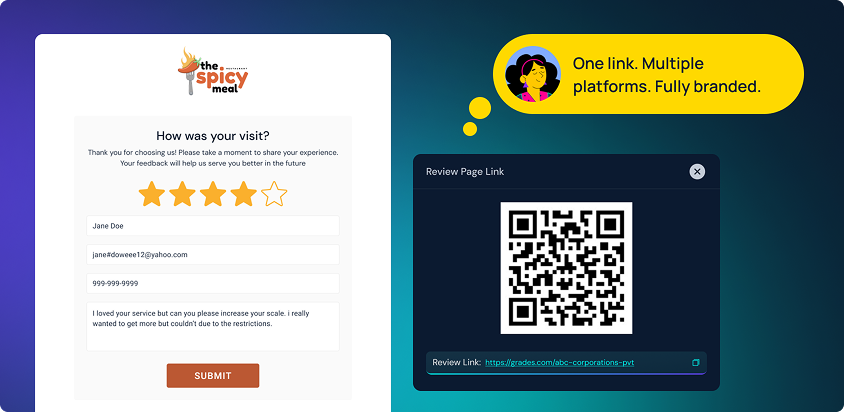
We built a dedicated landing page businesses could share via link or QR code:
- Customizable colors, logo, and intro text.
- Buttons for both direct reviews and public platforms.
- Owner controls order of platforms.
- Easy to drop in email footers, embed on a site, or print on materials.
5/7 The Widgets That Don’t Need a Developer
We wanted users to feel like they were editing in Canva, not wrangling a CMS.
- Click on a widget element, the settings pop right there — change colors, toggle elements, pick layout — and see the update live.
- We even added the option to auto-hide new reviews in widgets until approved, or automatically show them based on rating.

6/7 Social Shares That Feel Personal
Social templates let users pick a review manually or let Starwave select one randomly (still filtered by their rules).
We gave them instant color/logo defaults from their brand settings, so they could post without rebuilding every design from scratch.

7/7 Legal Compliance in the Details
We ran into a tricky problem: what if a business only selects Google and Trustpilot for a widget, but the badge shows an “overall” rating? That could be misleading.
Our solution:
- Aggregate scores can’t be shown unless all sources are included.
- If a source is missing, the display clearly states which platforms the rating comes from.
- A tooltip explains why certain toggles are locked: “To comply with platform guidelines, aggregate ratings must include all sources.”

The Edge Cases — Where Real Products Live
|
|
Real users do unexpected things. We planned for it.
|
|
Source Review Changes:
If a review changes or gets deleted, Starwave pauses it and alerts the user. Overrides stay saved until re-published.
|
Archived Reviews:
Deleted or edited reviews move to a private archive. Owners can request a purge, but final action stays with admins.
|
Accessibility Nudges:
We don’t block low-contrast colors, but we warn: “Your choices may affect readability.” The preview guides the rest.
|
Beyond the Platform
Once the core app was ready, we designed a 4–5 page marketing microsite, complete with social media profile graphics, cover images, and email templates — so Starwave could launch like a polished product, not a half-finished idea.

The Outcome
By launch, Starwave gave small business owners exactly what they needed:
- One login to see and respond to all their reviews
- A faster way to turn happy customers into visible proof of trust
- Compliance guardrails they didn’t have to think about
- Widgets, badges, and social graphics they could actually edit themselves

Mr. Stars’ agency now bundles Starwave into their client packages — and for many of those SMBs, it’s their first time actively managing their online reputation instead of leaving it to chance.
What I Took Away
This was my first project where removing features made it better.
- Push back on scope creep without losing client trust
- Design legal compliance into UX without making it feel restrictive
- Build for people who want results, not tutorials
- Anticipate edge cases so they don’t become fires later



































 MEDIC
MEDIC
 MUSTR
MUSTR
 SITES
SITES